

OpenAPI
To configure your custom Open Data environment you share an OpenAPI Schema with Fiskil that defines your resource server API. This schema contains:- Your endpoints
- Permissions required to access each endpoint
Endpoint Requirements
customerId path parameter
The paths in your endpoints must contain /customer/{customerId} so Fiskil can request the data for the user who authorised sharing. For example:
customer/{customerId} path parameter is required to ensure data from the correct customer is accessed.
Third parties requesting data from your environment don’t provide the customer/{customerId} in their request, Fiskil trims this from the
API endpoint. For example: you might
provide an OpenAPI definition with the following endpoints:
/v1/customer/{customerId}/pay/v1/customer/{customerId}/payslips/v1/customer/{customerId}/payslips/{id}
/v1/pay/v1/payslips/v1/payslips/{id}
authorized_account_ids query parameter
During the Consent Flow, end users are prompted to authorise the accounts they wish to make available for data sharing. This list of accounts is populated by the List accounts available for sharing API.
To ensure that only data from authorised accounts is shared, Fiskil will specify the authorised account IDs when Fiskil requests data from all of your resource server APIs using a query string parameter: authorized_account_ids.
- Read the
authorized_account_idsURL query parameter value - Split the value by
,to get the authorised account IDs - Filter the requested data so that only resources belonging to an authorised account are returned from your API
Scopes
Open ID Connect Scopes are used to authorise the sharing of specific datasets from your users. Your users review the scopes being requested by third parties so they know exactly what data they are sharing. Fiskil uses two OpenAPI extensions to define the scopes required to access your data.- Data Sharing endpoints must have a
x-fiskil-scopesextension defining the scopes that must be authorised by the user to access the data - The
infoblock must contain ax-fiskil-scopesetextension that defines the list of scopes supported and descriptions of them
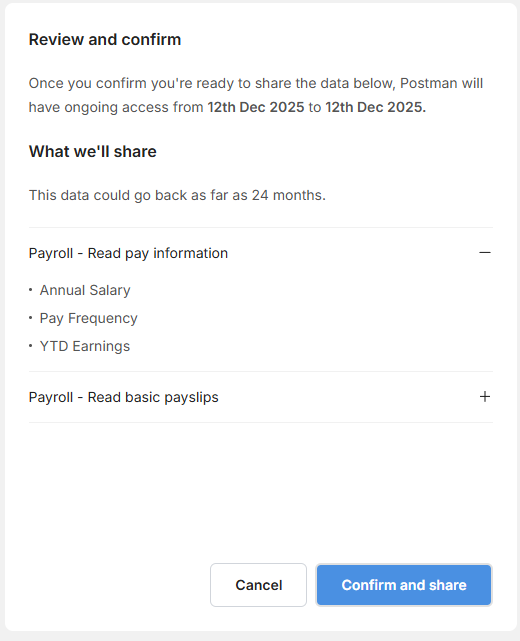
x-fiskil-scopeset extension on the info element lists the available scopes: payroll:pay:read. The cluster_language field presents a high-level description of the data that is shared. The permissions_language field
shows the exact pieces of data that fall under this scope.
The x-fiskil-scopes extension on the getPayInformation operation shows that the payroll:pay:read scope is required if a third party wants to access the pay dataset.
This information is shown to the end user during authorisation
Uploading your OpenAPI Specification
You provide your OpenAPI Specification to Fiskil through the Fiskil Data Provider console. Navigate to the Resource Server Settings Menu and upload your specification. The Fiskil platform will validate your OpenAPI document against the requirements listed above. Once you’ve uploaded your specification, develop your resource server to implement your OpenAPI specification. After completing both these steps your environment is ready for testing. Download a full example of a Fiskil-compatible OpenAPI definition including customer ID path parameters and scope definitionsExtension Reference
x-fiskil-scopeset
Parent element: info
Type: Map<string, object>
Object properties:
x-fiskil-scopes
Parent element: method
Type: List<string>
All values within the list must be present as a key in the x-fiskil-scopeset map.
Example: